Object groups, review rights and quality rules
An object group selects objects. A validation right defines what a business group examines on those objects. A quality rule describes a condition to detect in the reference. These definitions serve different purposes.
Themes and object groups
Create or select a theme to organise the tree, then define a named object group with its selection condition. Use meaningful names that users recognise. Test the condition with Test rule before saving or assigning broad responsibilities.
A relation is not necessarily present as a rendered line or polygon. The object-group test takes relations into account through their primitive data. A successful group test confirms matching objects in its test scope; it does not prove that those objects have pending monitored changes.
Validation rights
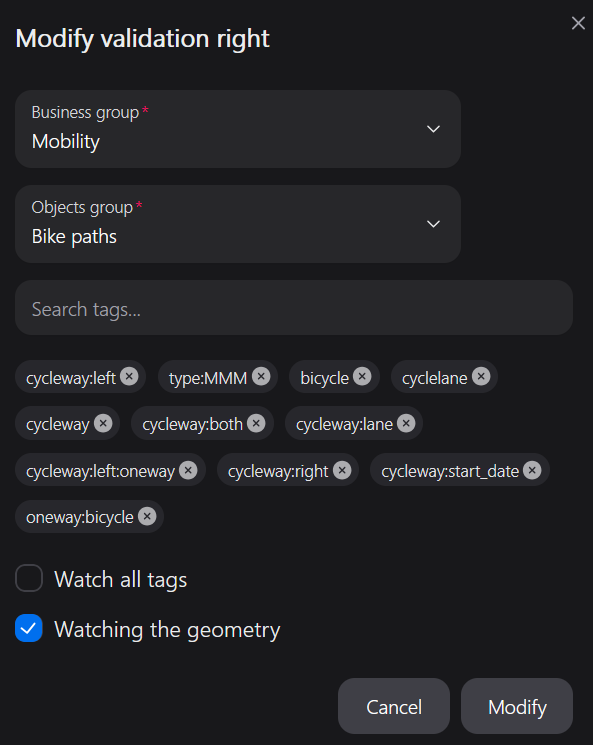
For each business group / object group association, choose geometry review, all-tag review or the relevant tag keys. Reviewing every tag is broader than watching a short list and usually increases workload.
For example, a road team might monitor highway, access and geometry, while another team watches a different attribute set. Review the resulting partial-validation information with both teams. Similar-change search follows monitored changes; it should not be treated as a comparison of all tags.
Changes below the configured geometry tolerance can have od_changed_geom=false. This suppresses that geometry-review obligation, not the actual coordinate differences or the integration consistency checks.
Quality rules
- Select the object group providing the population to inspect.
- Give the rule a clear name and a description explaining what to check.
- Enter the supported SQL condition and use the test provided by the form.
- Enable the rule and assign its business groups.
- Open Quality with an affected user and inspect a representative finding.
The condition is combined with the object's group condition. It is not a free-standing maintenance SQL script. Follow the field's expected syntax rather than pasting a complete UPDATE or a database migration.
A quality rule is evaluated against published reference geometries. A primitive relation without a corresponding published geometry is not equivalent to a line/polygon quality finding; do not generalise the object-group relation test to every quality query.
Changes to a rule can change which findings appear. Keep descriptions useful: explain what would make a finding acceptable, what external evidence to consult and who maintains the rule.
Automatic validation
Object groups offer an automatic-validation option. The Contributors area also lets administrators enable automatic validation for an OSM contributor. On its next pass, the pipeline can move matching changes from tovalidate to valid. Use these options only as an explicit review policy: they apply only when no manual obligation remains and are not display preferences.
Automatic approval does not replace integration checks. A dependency, affected parent or inconsistent context can still block the batch. It also differs from the planner's inclusion of a dependency with no monitored change.
For a simple quality condition such as a missing capacity key, the form accepts a condition such as:
NOT tags ? 'capacity'
Combine this condition with the appropriate object group; it does not establish that capacity should be mandatory on every OSM object.
Automatic validation and manual groups
Automatic validation through an object group or contributor does not bypass changes monitored by another active manual group. Partial refusals or waiting decisions remain blocking. See the validation policy.