SMTP and delivery monitoring
The Email sending (SMTP) section in Administration Settings contains server configuration, a test action and delivery monitoring.
Configure sending
- Enter the host, port, security mode and authentication expected by your mail provider.
- Set the sender information and save the SMTP settings.
- Send a test to an address you control and verify receipt.
- Check the scheduled email service and the application's public URL before inviting users to subscribe.
The public URL used for account links must be reachable by recipients. SMTP settings alone do not schedule summaries. The protected encryption key and worker configuration are installed using the deployment procedure. Preserve the key when migrating or restoring configuration; changing it can make stored SMTP credentials unreadable.
An SMTP server accepting a message does not guarantee inbox delivery. Investigate provider rejection, spam handling or domain configuration separately when submission succeeds.
Read delivery monitoring
The monitoring panel reports worker freshness, subscribed/suspended counts and per-user delivery state. Search for a user or filter suspended entries. Expand a row to inspect the current address, last check, last send, next due time, attempt count, error and message identifier where available.
| Situation | Action |
|---|---|
| No recent worker activity | Check the email timer/service and web application's internal endpoint |
| Ineligible recipient | Check verified address, subscription, territories, rights and enabled modules |
| Authentication/connection failure | Fix SMTP configuration and inspect the server journal |
| Failed delivery | Resolve the cause before using the offered retry action |
| Uncertain delivery | Investigate the SMTP/provider evidence before deciding whether it was sent |
For an uncertain outcome, the interface offers an explicit resolution rather than silently sending again. Confirm only the conclusion supported by the mail logs. A recovery action is recorded; it does not resubscribe a user who opted out.
Privacy
Email addresses and delivery diagnostics are administrative information. Redact them from shared screenshots and incident reports. Never include SMTP passwords, verification tokens or unsubscribe tokens in support material.
Users manage their own verified address and subscriptions in My account; their report workflow is described in Notifications.
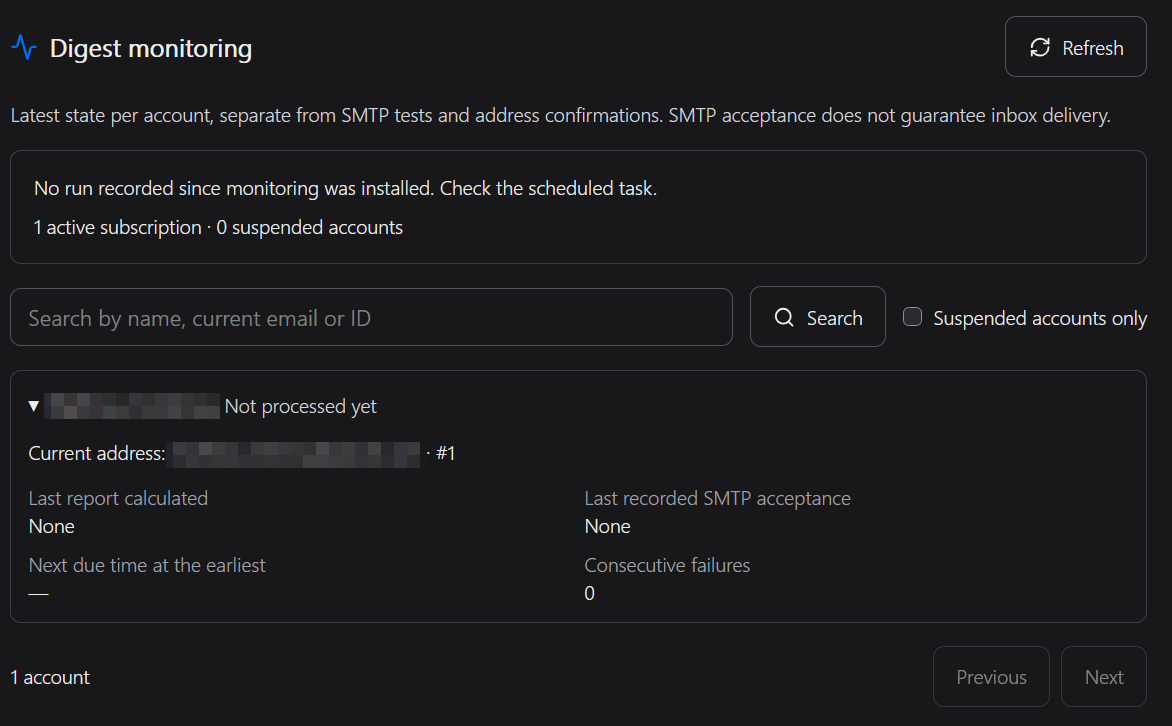
Allowing a retry in the tracking process does not immediately trigger an email; the scheduled task handles this. The SMTP test uses the saved configuration, even if automatic emails are disabled.